July 26, 2026
·By Ryo Shibata, CTO
Reorder Point: The Formula, With Real Numbers
Ask most small business owners when they reorder a given SKU, and the honest answer is usually “when it looks low” or “when someone remembers.” That works fine until it doesn’t: a bestseller sells out faster than usual, the reorder gets placed a week late, and now you’re explaining a stockout to a customer instead of fulfilling the order.
What is a reorder point?
A reorder point is the inventory level at which you should place a new order, set so the replacement stock arrives before you run out, not after. It’s calculated from three things you already have on hand: how fast a SKU sells, how long your supplier takes to deliver, and how much buffer you want against a demand spike or a late shipment.
The formula
Reorder point equals average daily sales multiplied by supplier lead time in days, plus a safety buffer for demand that runs higher than average:
Reorder point = (average daily sales x lead time in days) + safety stock
Worked example: you sell 10 units a day, your supplier takes 14 days to deliver, and you want a few days of buffer against a busy week. Ten units a day for 14 days is 140 units of demand during lead time. Add a buffer worth roughly two to four days of average sales, 20 to 40 units, and your reorder point lands somewhere around 160 to 180 units. Hit that number, place the order. Simple in principle, and for a SKU with steady sales and a supplier who ships on time, that’s genuinely the whole calculation.
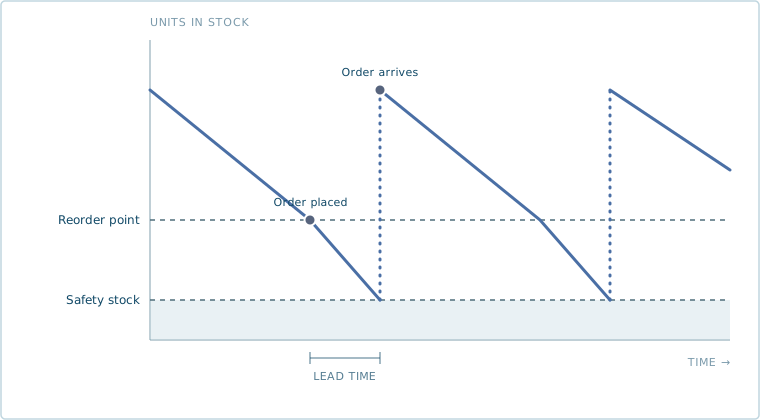
Stock declines at a steady rate, crosses the reorder point, and keeps falling through the lead time before the new order arrives and the cycle resets.
Most guides stop there. The formula holds up fine in the example above because both inputs, sales pace and lead time, are treated as fixed numbers. In practice, neither one is, and that’s where the math most small teams actually use it on breaks down.
When lead time isn’t a fixed number
Fourteen days is an average, not a promise. A supplier who usually ships in two weeks might take nine days one month and nineteen the next, depending on their own backlog, a shipping delay, or a material shortage on their end. If you build your reorder point around the average lead time alone, you’re exposed every time the actual delivery runs long, which for most suppliers is close to half the time by definition.
The fix is to build the safety stock portion around the spread, not just pad the average. Take your average lead time and your worst realistic lead time over the last several orders, not a hypothetical worst case, the actual slowest delivery you’ve seen. If that supplier averages 14 days but has run as long as 19, the gap is 5 days. At 10 units a day, that’s 50 units of extra exposure a flat “add a few days” buffer would have missed. Reorder point becomes (average daily sales x average lead time) plus (average daily sales x that gap), which gives you a number sized to the supplier’s actual reliability instead of a guess. A supplier whose lead time has been slipping needs this recalculated more often than one who ships like clockwork, since the gap between average and worst case only gets wider while nobody’s watching it.
Reorder points when a SKU has more than one supplier
Plenty of wholesale operators dual-source a SKU on purpose, a primary supplier for cost and a backup for when the primary runs late or is out of capacity. The formula above assumes one lead time, so the honest question is which one to use.
The answer depends on how the backup actually functions. If you only place an order with the backup supplier as a last resort, when the primary has already failed, your reorder point should still be built around the primary’s lead time, since that’s the order you’ll place first in the normal case. What changes is the buffer: it needs to cover not just the primary’s demand-during-lead-time, but enough runway to notice the primary has slipped and get an order to the backup before you’re out. If you actually split volume between both suppliers on a regular rotation, the calculation is closer to two smaller reorder points, one per supplier, each sized to its own share of daily sales and its own lead time, rather than one blended number that doesn’t match either supplier’s real timeline. Either way, the reorder point stops being a single clean number and starts being a policy: which supplier gets the order first, and what has to be true before it goes to the second one. That’s the part manual tracking loses first once a business is coordinating more than a couple of supplier relationships per SKU.
Setting a reorder point for a brand new SKU
None of this works for a SKU you’ve never sold, because there’s no average daily sales number to plug in. Waiting for real sales history before setting a reorder point isn’t really an option either, since that’s exactly the window where you’re most likely to either stock out on a launch that takes off or sit on cash tied up in a launch that doesn’t.
The practical fix is to borrow a number, not invent one. Find the closest existing SKU you already sell, similar price point, similar customer, similar category, and start the new SKU’s reorder point using that SKU’s early sales pace rather than a guess pulled from nowhere. If you don’t have a good comparison, start conservative: a smaller initial order sized to sell through in a few weeks even at a modest pace, so a slow start doesn’t leave you overstocked and a fast one doesn’t leave you fully out before you’ve collected enough data. Either way, treat the first 30 to 60 days of real sales as the trigger to replace the borrowed number with an actual one. This is the same problem demand forecasting runs into with a new SKU, and the fix is the same one: use a comparable product’s pattern until real data exists, then switch to it the moment it does.
A reorder point tells you when, not how much
It’s worth separating two decisions that get blurred together. The reorder point answers “when do I place the order.” It doesn’t answer “how many units do I order,” which is a separate question involving supplier minimums, case pack sizes, and how much cash you want tied up in one purchase order at a time. A reorder point of 160 units doesn’t mean you order exactly 160, it means 160 is your signal to act. What you order at that point might be a fixed reorder quantity, a full case-pack multiple, or enough to bring you back up to a target maximum. Conflating the two is a common source of “the math didn’t work” complaints that are really about the order quantity decision, not the reorder point itself.
Common mistakes that quietly break the formula
A reorder point calculated once and never revisited is really just a guess wearing a formula’s clothes. Daily sales pace shifts with seasonality and promotions, lead times drift the way any supplier relationship does over time, and a number that was right in March can be wrong by June without anyone noticing until a stockout forces the issue. A second, subtler mistake: treating a stockout period as if demand simply stopped during it. If a SKU sold out and customers kept trying to order anyway, that unmet demand belongs in your next average daily sales calculation, not in a gap that quietly understates how fast the SKU actually moves. And a single safety buffer applied evenly across the whole catalog gets both ends wrong: a bestseller with tight margins for error needs a bigger buffer than a slow mover that’s more at risk of becoming dead stock than a stockout.
Letting the number update itself
The math isn’t hard. Keeping it current for every SKU, every week, as sales pace and lead times shift, is the part that stops happening once things get busy. Reorder exists for exactly this: it watches the reorder point per SKU continuously, accounting for lead time variability and supplier-specific timelines rather than one flat average, and places the purchase order the moment it’s hit, at the quantity and supplier already worked out, so restocking doesn’t wait on someone remembering to check.
FAQ
What is a reorder point? The inventory level at which you should place a new order, calculated so replacement stock arrives before you run out. It’s average daily sales multiplied by lead time in days, plus a safety buffer.
How do you calculate a reorder point? Multiply average daily sales by supplier lead time in days to get demand during lead time, then add a safety stock buffer sized to cover demand spikes and lead time variability. Selling 10 units a day with a 14-day lead time gives 140 units of demand during lead time, plus buffer, the same daily-sales-pace number Demand Forecasting keeps current as trend and seasonality shift.
What’s the difference between a reorder point and safety stock? Safety stock is the buffer portion. The reorder point is the full trigger number, demand during lead time plus that buffer, the actual level that tells you to place an order, a number that only stays right if Inventory Tracking is accurate enough to trust it.
How do I set a reorder point for a new product with no sales history? Borrow the early sales pace of a comparable SKU you already sell, or start with a conservative order sized to sell through in a few weeks, then replace the borrowed number with real data after 30 to 60 days, the same borrowed-number approach that keeps a purchase order approval workflow from stalling on a SKU with no track record yet.